Agencies
AI candidate matching for recruitment and staffing agencies
Venora Match ranks every application against your client’s brief, finds the people you already know when a new vacancy opens, and shows why each candidate is on the shortlist. Your consultants make every decision.
Where an agency desk loses the day
Screening every CV by hand
A client role goes live and a hundred applications arrive. Each one has to be opened, read against the brief and sorted — before anyone has spoken to a candidate.
Forgetting who you already know
The right person for today’s vacancy is often someone you spoke to last year. Finding them means remembering them, or rebuilding a search from keywords that miss half the pool.
Explaining the shortlist
The client asks why these three and not the others. The answer exists in a consultant’s head, and it differs from one consultant to the next.
See the product
What your recruiters see in Venora Match
Real screens from the product, running on a demo workspace. No slide deck, no mock-ups.
- 01 · Your roles
Every open role, and who is waiting on a decision
Import the job description and the CVs you received, in PDF or Word. The home screen groups candidates by role and shows what needs your attention today.
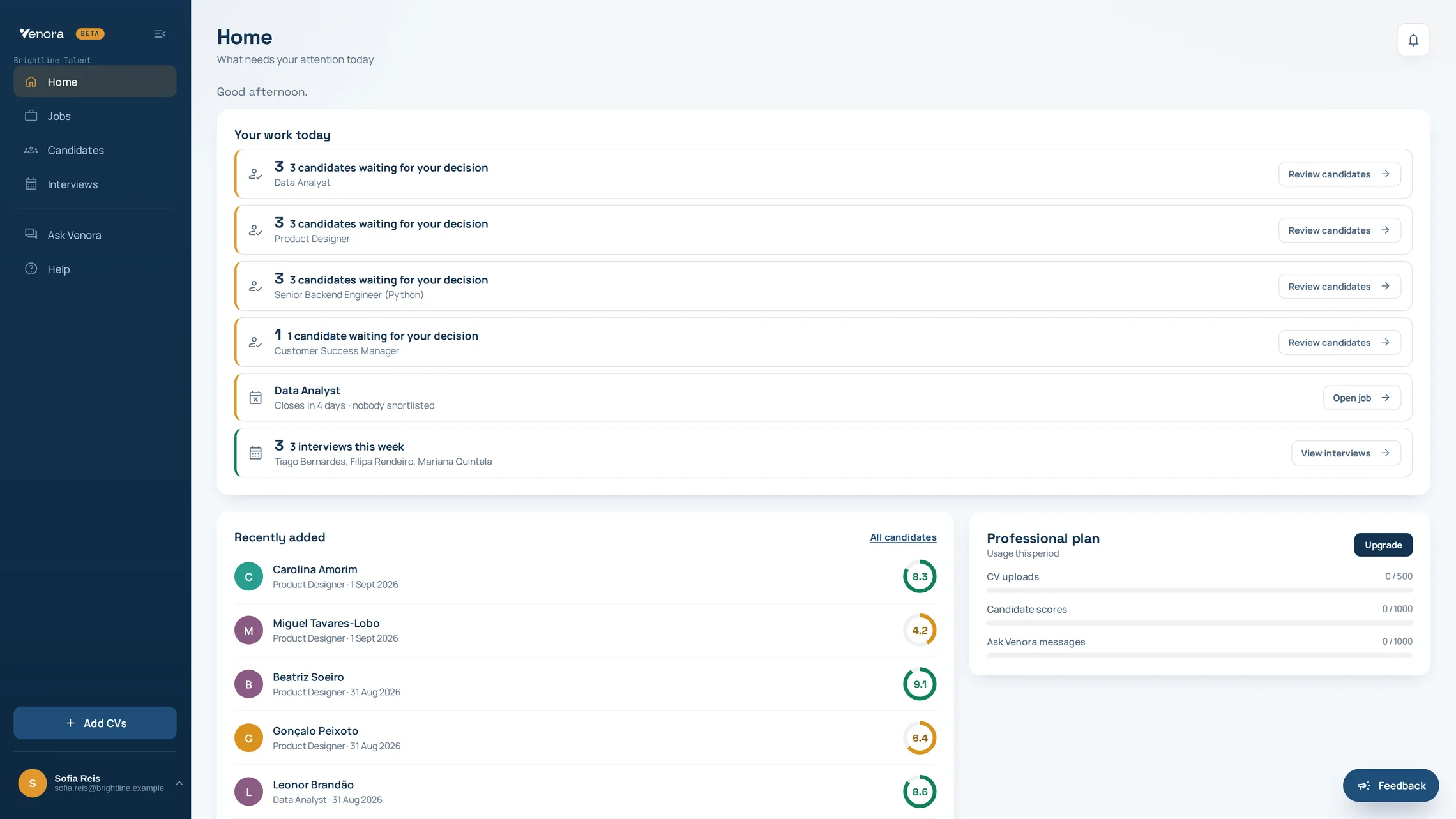
Demo workspace. Every candidate on screen is fictional. - 02 · The match
Why a candidate matches — and where they fall short
Each fit score comes with the reasons for and against, a written recommendation, and a requirement-by-requirement table showing the evidence from the CV behind each one. Essential and preferred requirements are kept apart.
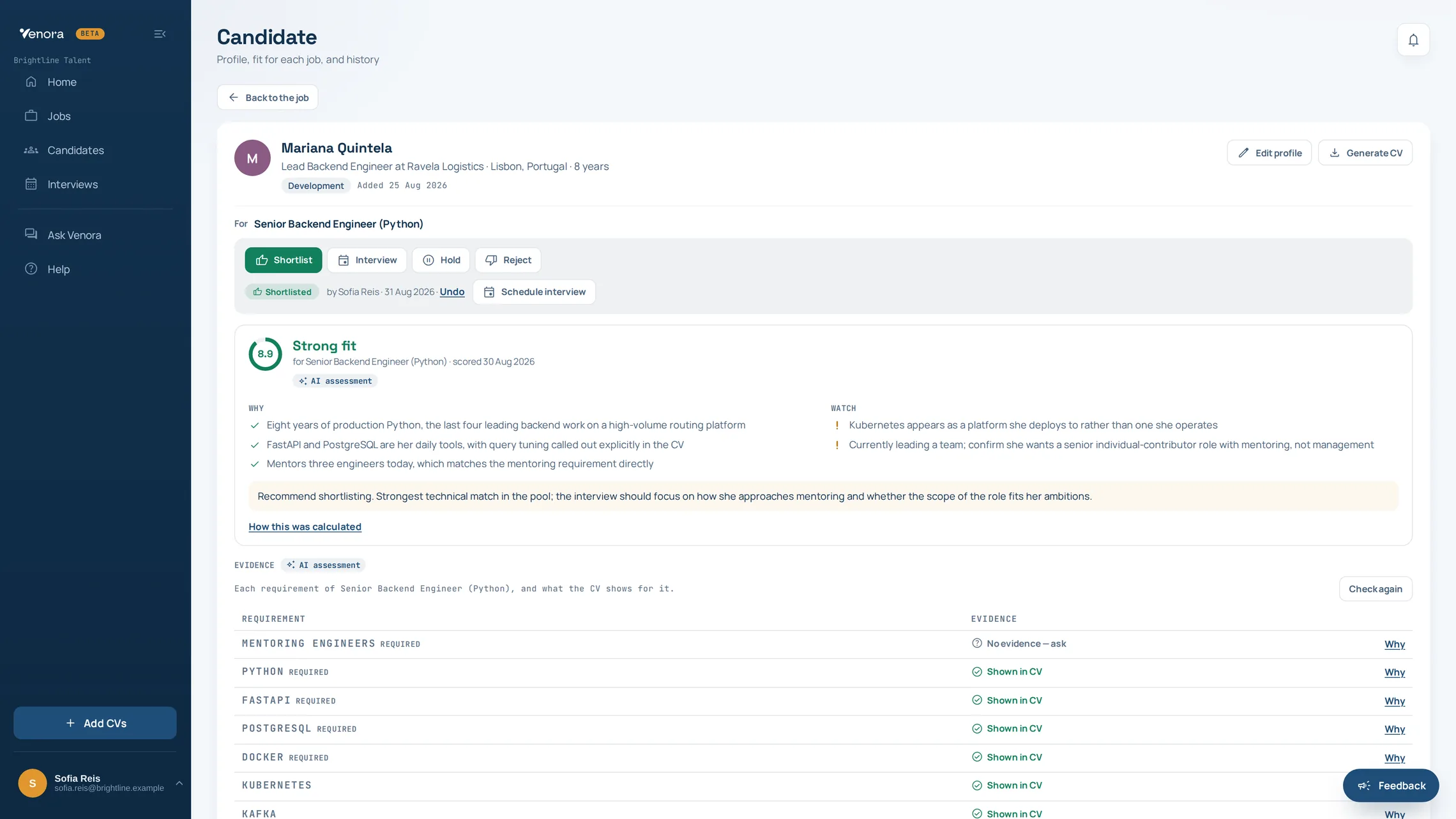
Demo workspace. Every candidate on screen is fictional. - 03 · Your decision
The recruiter confirms, corrects or rejects
Venora Match never rejects a candidate on its own. The review queue keeps the fit report open beside each person, and every confirmation is recorded with who made it and when.
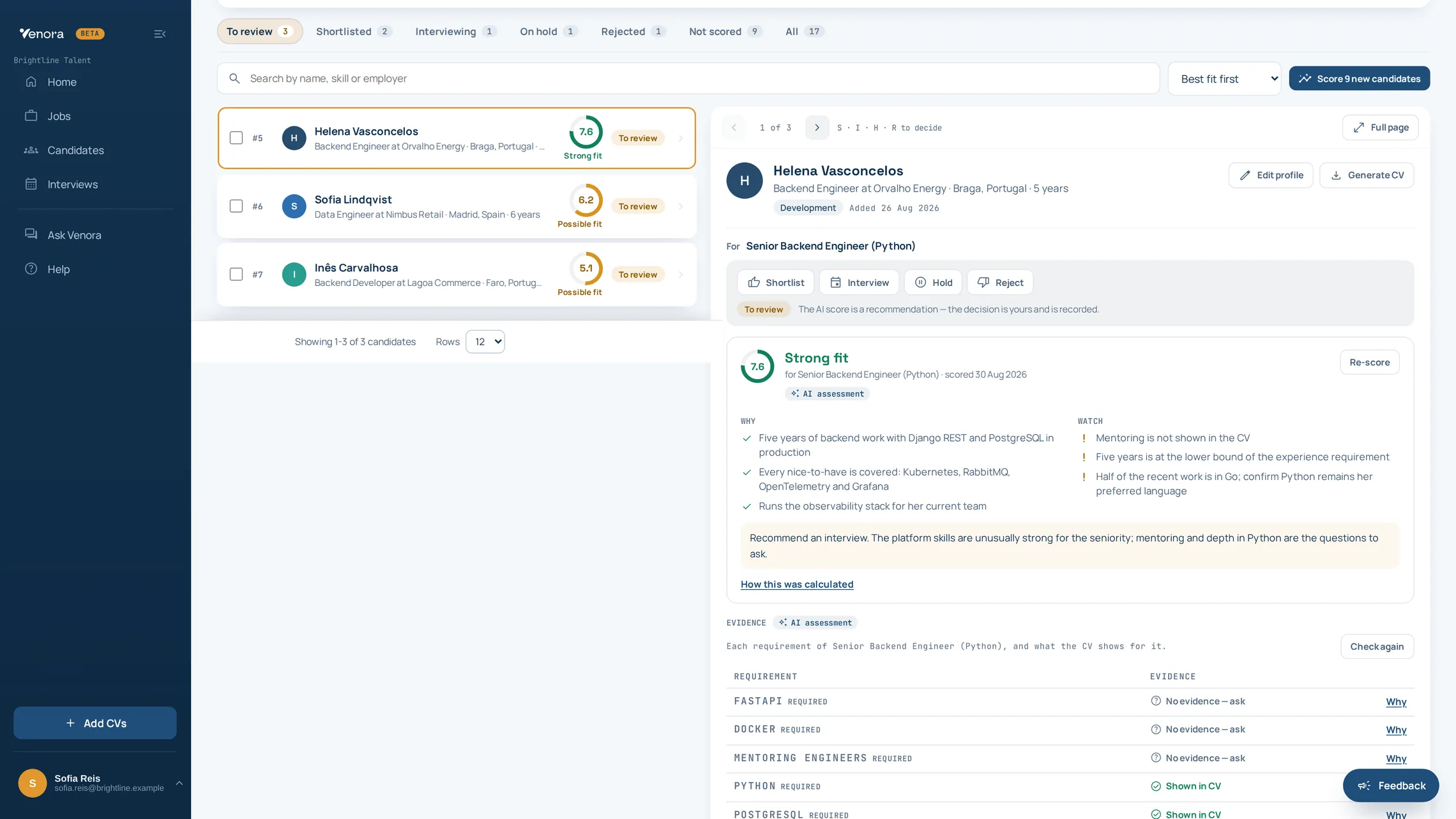
Demo workspace. Every candidate on screen is fictional.
Want to see it on one of your own vacancies? Early-access teams run it on a real role with us in the first session.
What changes for your consultants
The pool is the asset, not the vacancy
An agency’s advantage is the people it already knows. Semantic search reads that pool in plain language — “who has cloud experience and can start in March?” — and answers with the reasoning behind each result, so a candidate placed eighteen months ago is findable when the right role appears.
The client format problem, solved once
Every client wants the CV their way. Venora Match reformats a shortlisted candidate’s CV into your template as DOCX or PDF, so the hours spent retyping someone else’s career into your house layout stop being part of the job.
When the client asks why this shortlist
Each candidate carries the score, the requirements met and missed, the evidence behind both, and the name of the person who confirmed the decision. That is the answer to “why these three?” — available immediately, not reconstructed from memory.
Margin, not headcount
Screening is the part of the work that scales worst: twice the applications, twice the afternoon. Moving it to a tool that reads everything and explains itself is what lets a small desk take on more roles without adding a reviewer.
Illustrative example
A worked example: one candidate, one client role
Role Payroll Specialist — for a client in logistics
| Requirement | Type | Result | Evidence in the CV |
|---|---|---|---|
| Three or more years running payroll end to end | Essential | Met | Payroll Officer, 2019–2024: monthly payroll for around 450 employees |
| Portuguese payroll legislation | Essential | Met | Prepared Social Security and IRS withholding returns each month |
| Advanced Excel | Essential | Missing | Excel appears in the skills list, but no example of advanced use is given |
| SAP HR or SuccessFactors | Preferred | Missing | No mention of SAP in the CV |
| English at B2 or above | Preferred | Met | Cambridge B2 First certificate, 2018 |
The consultant sees a strong match with one essential requirement not evidenced. They ask about Excel in the screening call, note SAP as a training point for the client, and confirm the candidate onto the shortlist. The decision, and who made it, is recorded with the vacancy.
Written for this page with an invented candidate, to show the kind of reasoning Venora Match gives. The real screens are shown above.
Transparent matching. Your consultants decide.
- Every fit score arrives with the reasons for and against, and the evidence from the CV behind each requirement.
- Essential and preferred requirements are kept apart, and the ranking treats a missing must-have differently from a missing nice-to-have.
- Identifying details are removed before the analysis runs, so candidates are compared on what they have done.
- Venora Match never rejects a candidate on its own, and it cannot be configured to.
- Each decision is recorded with who made it and when — the answer for the client, or the candidate, who asks later.
Questions
Questions agencies ask
Product
Data and compliance
Oversight and fairness
Getting started
See what Venora Match does in full, how it compares with other tools, or the other way teams run it.
Early access · V1.0 launching November 2026
Help shape the future of AI-assisted recruitment
We are inviting a small group of recruitment agencies and talent teams to use Venora Match on real vacancies, tell us honestly what works and what does not, and help decide what we build next.
- Nothing is charged during early access. Early-access teams then keep the published launch rate for their plan, locked for twelve months, and we tell you before any plan starts billing.
- You work directly with the team writing the software.
- No preparation beyond a real role and the CVs you received for it.
What happens next
- You send this form. It takes under a minute.
- We reply within two business days to arrange a time.
- In a twenty-five-minute session we run Venora Match on one of your real vacancies, with you.
- If it is useful, your team keeps using it on real roles through early access, with direct support from the people building it.
Recruitment agency? See how agencies use Venora Match.